
Free Software Download Center
Software for industrial data collection, monitoring, and analysis.
TEXT EDITING • LINE BREAKS • IMPROVING THE OPERATOR INTERFACE
In user controls used within EOS SCADA, the text displayed to the operator plays an important role in understanding the function of the control.
Especially for buttons, switches, and similar user controls, formatting the text to fit the dimensions of the control improves the readability and ease of use of SCADA screens.

Various explanatory texts can be displayed on or within user controls used on SCADA screens. These texts can be used to clearly indicate the function of a button, the operation to be performed, or the option presented to the user.
The size of a user control and the length of the text displayed on it may not always be compatible. Especially for buttons with long operation names, text that does not fit on a single line can disrupt the visual layout of the control.
In such cases, splitting the text at an appropriate point and displaying it on multiple lines improves both the usability of the control and the operator's ability to read the text.
EOS SCADA allows special line-break expressions to be used in user control text, making it possible to display long texts in a more organized manner within the control.
If the text within a user control needs to continue on a new line from a specific point, the expression @ENL or [ENL] can be inserted at the desired position in the text.
ENL is an abbreviation for Environment New Line and is used to display the remainder of the text on a new line.
Available line-break expressions:
@ENL
[ENL]
When one of these expressions is inserted at the appropriate position within the text, the remainder of the text displayed on the user control is moved to a new line.
For example, suppose the text START MOTOR needs to be displayed on a button, but the button is not wide enough to display the text on a single line.
Instead of reducing the text size or unnecessarily increasing the size of the user control, the text can be split into two lines at an appropriate point.
Single-line usage:
START MOTOR
Using @ENL:
START@ENL MOTOR
Using [ENL]:
START[ENL] MOTOR
In the last two examples, the text is arranged so that START is displayed on the first line and MOTOR is displayed on the second line.
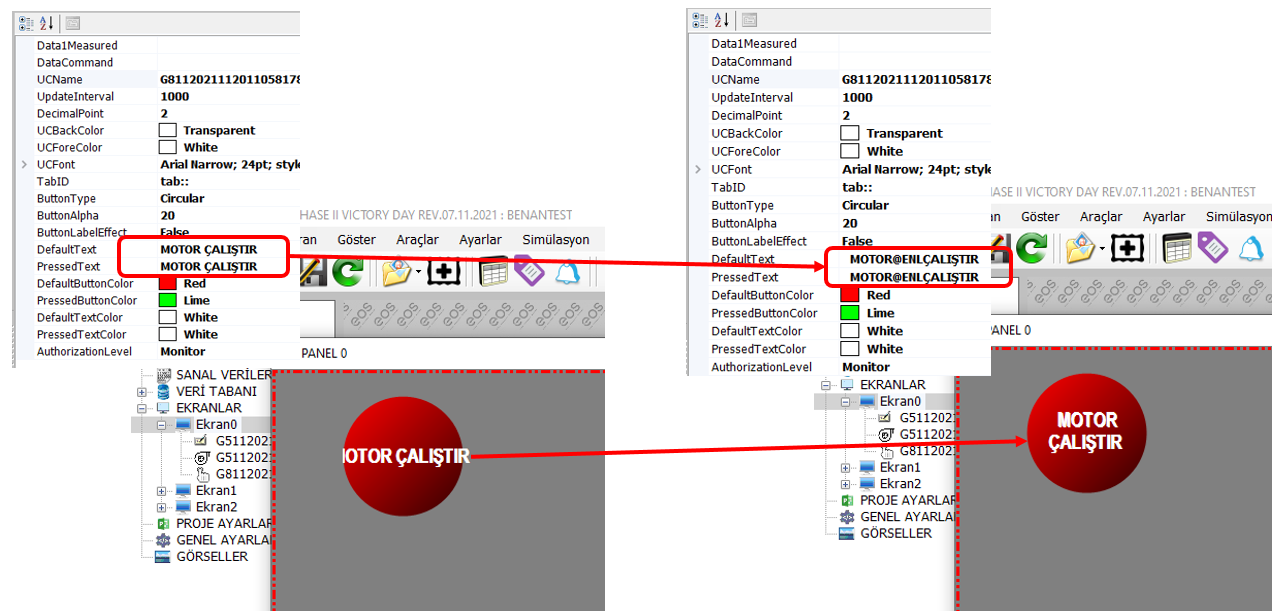
The line-break feature is not used only to fit long texts within a control. It can also be used to improve the visual consistency of SCADA screens and their readability for operators.
When determining where to use a line-break expression within the text, care should be taken to preserve the meaning and integrity of the text.
Line breaks should be introduced, whenever possible, without separating words or meaningful groups of words from each other. This allows the text to remain easy for the operator to understand even after being split across two lines.
CAUTION: When splitting text into multiple lines, do not introduce a line break at a point that could distort the meaning of the text or cause the operator to misinterpret it.
This is particularly important for text displayed on user controls that send commands. The text should be clear, understandable, and accurately describe the operation being performed.
Text used in EOS SCADA user controls is an important design element in terms of the clarity and usability of the operator interface.
When the text to be displayed on a control does not fit within the user control, the control does not need to be unnecessarily enlarged. Instead, the text can be split across multiple lines using the @ENL or [ENL] expressions.
This method makes it possible to display long texts more systematically within user controls, improve the readability of operator screens, and achieve a more balanced SCADA screen design.
Free Software Download Center
Software for industrial data collection, monitoring, and analysis.

Technical Support
Software documentation, sample code, and practical technical information.
You can contact us regarding EOS software, technical documentation, or industrial data communication.