What is EOS SCADA?

EOS SCADA is a free SCADA platform designed for the centralized collection, monitoring, recording and analysis of industrial data used in power generation plants, industrial facilities and automation systems.

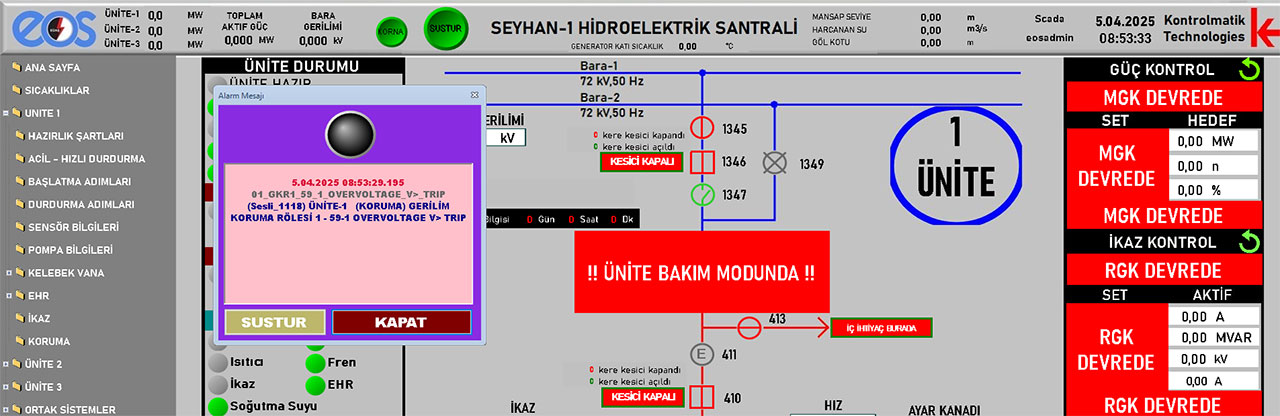
The system processes data received from field devices in real time and presents it to operators through graphical screens, alarm lists, event logs, trends and reports.

EOS SCADA supports a wide range of industrial communication protocols. Data can be acquired from PLCs, RTUs, control systems and other industrial devices using protocols such as Modbus, OPC UA, OPC DA, OPC XML-DA, MQTT, IEC 60870, IEC 61850, DNP3 and SNMP.

EOS SCADA Editor and Runtime

EOS SCADA Editor

EOS SCADA Editor is the development environment used to create and configure SCADA projects. It provides tools for designing graphical screens, defining data points, configuring communication and developing operator interfaces.

  • SCADA screen design
  • Tag and data point configuration
  • Alarm and event configuration
  • Graphics and user controls
  • Communication and device configuration
  • Operator screen development
  • Project configuration and management

EOS SCADA Runtime

EOS SCADA Runtime is the application used to execute projects created with EOS SCADA Editor. Runtime performs real-time data acquisition, monitoring, alarm and event management and data archiving.

  • Real-time data acquisition
  • Operator screens
  • Alarm management
  • Event and system logging
  • Data archiving
  • Trend and graphical displays
  • Reporting and data access

EOS SCADA Features

Real-Time Data Acquisition

Real-time data acquisition from PLCs, RTUs, control devices and other industrial systems.

Real-Time Monitoring

Real-time monitoring of plant and equipment status through graphical operator screens.

Alarm Management

Monitoring, recording and presenting alarm conditions to operators in real time.

Event Logging

Recording system and process events together with accurate timestamps for historical analysis.

Industrial Communication Protocols

Support for Modbus, OPC UA, OPC DA, OPC XML-DA, MQTT, IEC 60870, IEC 61850, DNP3 and SNMP.

Integrated Data Servers

Delivering collected industrial data to other systems and applications through JSON, HTML, XML, OPC UA, Modbus and MQTT.

Redundancy

Support for different SCADA redundancy and high-availability architectures for critical industrial applications.

Free to Use

EOS SCADA Editor and Runtime can be downloaded and used free of charge without a subscription.

Supported Industrial Protocols

EOS SCADA supports a wide range of industrial communication protocols for connecting field devices, PLCs, RTUs and industrial systems from different manufacturers.

  • MODBUS
  • OPC UA
  • OPC DA
  • OPC XML-DA
  • MQTT
  • IEC 60870
  • IEC 61850
  • DNP3
  • SNMP

Free EOS SCADA Download

Download the latest EOS SCADA release and use EOS SCADA Editor to create your projects and EOS SCADA Runtime to execute them in real time.

Note: If you are working with an older project, use the EOS SCADA version compatible with the version in which your project was originally created.

🚀 EOS SCADA 2026

EOS SCADA 2026 is the current-generation version of the EOS SCADA platform. It includes updated database infrastructure, advanced data management, modern web-based data delivery and expanded industrial communication capabilities.

Installation and Usage

EOS SCADA Editor and Runtime are provided as separate applications. A SCADA project is first created and configured using Editor. The completed project is then executed with Runtime for real-time data acquisition, monitoring and control.

  1. Download the EOS SCADA portable RAR package.
    Click the download link above to download the EOS SCADA package to your computer.

  2. Extract the EOS SCADA files.
    Extract the downloaded RAR package into a folder named EOS_SCADA_2026 and place this folder directly under the C:\ directory.

  3. Install Firebird 5 Database.
    EOS SCADA uses Firebird as its database infrastructure. Download and install the appropriate Firebird 5 version for your Windows operating system from the official Firebird download page .

  4. Configure administrator privileges and security exclusions.
    Enable the Run as administrator option for EOSscadaED.exe and EOSscadaRT.exe. Allow the communication ports used by EOS SCADA through the Windows Firewall. If third-party antivirus or security software is installed, configure appropriate security exclusions for EOSscadaED.exe, EOSscadaRT.exe and C:\EOS_SCADA_2026 when required.

  5. Create desktop shortcuts.
    Create desktop shortcuts for EOSscadaED.exe and EOSscadaRT.exe located in C:\EOS_SCADA_2026.

  6. Start EOS SCADA Editor.
    Double-click the EOSscadaED.exe shortcut to launch EOS SCADA Editor and create your SCADA project.

  7. Design and run your project.
    Define devices, communication protocols and data points, create graphical screens and run the completed project using EOS SCADA Runtime.

Free SCADA Software for Industrial Automation

EOS SCADA is free SCADA software designed for industrial automation, power generation, real-time data acquisition and plant monitoring applications.

With EOS SCADA Editor and EOS SCADA Runtime, you can create SCADA projects, collect data from field devices and monitor industrial processes in real time.

Development of the software and the addition of new features are ongoing. Technical documentation, example applications and supporting tools are shared through the EOS Industrial Software Hub.