EOS Event Recorder software is designed to collect alarms, events and
system changes from industrial facilities in real time, record them with timestamps and
enable historical analysis.
The EOS Event Recorder family provides two different approaches:
EOSFastER focuses on high-speed data collection and event archiving,
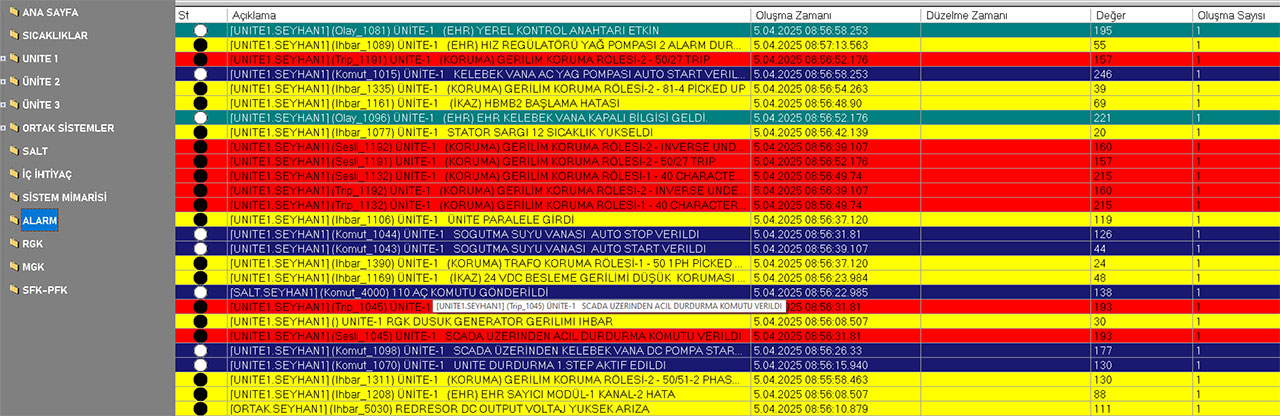
while EOSVisualER also includes an advanced
Alarm List user control that allows operators to view, evaluate and
process alarms.
What is EOS Event Recorder?
EOS Event Recorder is a high-performance event recording software designed to collect and
archive alarms, events, status changes and user interactions occurring in SCADA and
industrial automation systems in real time.
In a SCADA system, knowing only the current state is not enough. It should also be possible
to investigate
when an event occurred, which device caused it, which value changed and how the event
developed
over time.
EOS Event Recorder records this information together with timestamps, helping create a
detailed operational history of the facility. Recorded events can later be filtered, queried
and analyzed.
EOS Event Recorder Software
EOSFastER
EOSFastER.exe is an Event Recorder application developed for the
collection and archiving of high-speed industrial event and alarm data.
Its primary purpose is to process events received from field systems and SCADA as
quickly as possible and create a reliable event archive.
- High-speed alarm and event collection
- High-speed event processing
- Timestamped event recording
- Alarm and event archiving
- Historical event queries
- Filtering and historical analysis
- Integration with SCADA systems
EOSVisualER
EOSVisualER.exe is an advanced Event Recorder application that
provides the event recording and archiving capabilities of EOSFastER, while also
allowing operators to directly view and manage alarms.
The key difference of EOSVisualER is that it does not merely
collect and record
alarm data; it also presents alarms to operators in real time through the
Alarm List user control and allows them to process alarms during
operation.
- Alarm Lists
- Presentation of alarm states to operators
- Operator processing of alarms
- Historical alarm and event queries
- Filtering and analysis
- Integration with SCADA systems
EOSFastER vs. EOSVisualER
Both software applications can be used to collect and archive industrial alarm and event
information in real time. The main difference is how event records are presented to users
and the capabilities provided for alarm management.
| Feature |
EOSFastER |
EOSVisualER |
| Real-time event collection |
✓ |
✓ |
| Alarm recording |
✓ |
✓ |
| Event archiving |
✓ |
✓ |
| Historical event queries |
✓ |
✓ |
| Alarm List user control |
— |
✓ |
| Live alarm processing |
— |
✓ |
| Operator alarm management |
— |
✓ |
High Speed Data Collection
Real-time collection of alarm and event information from SCADA and industrial
systems.
Timestamped Recording
Recording events together with their timestamps and enabling the historical
sequence of events to be examined.
Alarm Recording
Reliable recording and archiving of alarm states and alarm transitions.
Alarm List
Presentation of active and historical alarms to operators through a graphical
user interface with EOSVisualER.
Filtering and Search
Events can be filtered and examined by time, type, source, equipment and other
information.
Historical Event Analysis
Querying and comparing historical events and examining process behavior over
time.
SCADA Integration
Event Recorder software can operate in integration with SCADA Runtime and
Editor.
Centralized Event Archive
Creation of a centralized event and alarm archive for industrial systems.
Not Just Recording — Alarm Processing
One of the important applications of the EOS Event Recorder family is the reliable recording
of the large number of alarms generated in SCADA systems.
EOSFastER focuses particularly on high-performance data collection and
event archiving. Alarms and events are received and processed rapidly, creating an archive
that can be examined historically.
EOSVisualER takes this approach one step further. Through its integrated
Alarm List user control, it does not simply archive alarm information; it
also presents alarms to operators in real time and allows them to be processed during
operation.
This means that an Event Recorder can serve not only as the facility's
digital memory, but also as a tool used by operators for alarm management.
Distributed and Redundant Operation
The Event Recorder architecture can be designed to allow multiple recording servers to be
used in critical industrial applications.
Using multiple Event Recorder instances to monitor systems on the same network and record
events simultaneously can increase the reliability of the recording infrastructure.
- Use of multiple Event Recorder instances
- Distributed event recording architecture
- Redundant event archiving
- Centralized integration with SCADA systems
- Architecture suitable for high-availability systems
Event Data Access and Analysis
Recorded events are not simply stored as historical records. Filtering, querying and
analyzing event history makes it possible to investigate the causes of problems that
occurred during operation.
The Event Recorder approach helps examine the historical behavior of a facility in greater
detail by associating events with information such as time, source, user, equipment and
event type.
- Querying historical events
- Filtering alarms and events
- Time-based event analysis
- Analyzing events with equipment and source information
- Transferring archived data to reporting systems
Free Download — EOS Event Recorder
EOSFastER and EOSVisualER are included in the
EOS SCADA 2026 package. Download the EOS SCADA 2026
package to use both Event Recorder applications according to your requirements.
Projects used by the Event Recorder applications are created and configured using
EOS SCADA Editor. Therefore, EOS SCADA Editor is required
to create and edit EOSFastER and EOSVisualER projects.
🚀 EOS SCADA 2026
EOS SCADA 2026 is the latest-generation SCADA platform developed for real-time data
collection, monitoring, alarm and event management in industrial facilities. In addition
to advanced data management and industrial communication capabilities, it also includes
the
EOSFastER and EOSVisualER Event Recorder applications.
Projects created with EOS SCADA Editor can be executed with EOS SCADA
Runtime. Depending on your requirements, EOSFastER can be used for
high-speed event recording and archiving, while
EOSVisualER additionally provides visual alarm monitoring and alarm
management.
EOS Event Recorder software can be used to record event and alarm information received from
SCADA systems or supported data sources in industrial facilities.
-
Download the EOS SCADA portable RAR package.
Click the download link above to download the EOS SCADA package to your computer.
-
Extract the EOS SCADA files.
Extract the contents of the downloaded RAR file into a folder named
EOS_SCADA_2026 and place this folder in the C:\ directory on
your computer.
-
Install Firebird 5 Database.
EOS SCADA uses Firebird as its database infrastructure. Download and install the
appropriate version of Firebird 5 for your Windows operating system from the
official Firebird 5 download page .
-
Configure administrator privileges and security exceptions.
Enable the Run as administrator option for EOSscadaED.exe,
EOSFastER.exe and EOSVisualER.exe. Also allow the
communication ports used by EOS SCADA through the Windows Firewall. If a third-party
antivirus or security software is installed on your computer, define the appropriate
security exceptions for EOSscadaED.exe, EOSFastER.exe,
EOSVisualER.exe and
C:\EOS_SCADA_2026
when necessary.
-
Create desktop shortcuts.
Create desktop shortcuts for
EOSscadaED.exe, EOSFastER.exe and
EOSVisualER.exe
located in the
C:\EOS_SCADA_2026 folder.
-
Start EOS SCADA Editor and prepare your project.
Double-click the
EOSscadaED.exe shortcut on your desktop to start
EOS SCADA Editor. Create the SCADA project to be used by the Event
Recorder applications and configure the required devices, communication protocols, data
points, alarms and events.
-
Run EOSFastER or EOSVisualER.
Depending on the purpose of your SCADA project, run either EOSFastER.exe or
EOSVisualER.exe. EOSFastER can be used for high-speed
event recording and archiving, while EOSVisualER additionally provides
visual alarm monitoring and alarm processing through the Alarm List.
-
Monitor and analyze event and alarm records.
Monitor collected alarms and events in real time, record them and query historical
records for analysis. When using EOSVisualER, operators can also
process alarms through the Alarm List.
Free Industrial Data Collection Software
EOS Event Recorder software is designed for the reliable collection, recording and analysis
of alarms and events occurring in industrial facilities.
EOSFastER focuses on high-speed event collection and archiving, while
EOSVisualER
provides a graphical user interface that presents alarm information to operators and
supports alarm management.
Development of the software and the addition of new features are ongoing. Free software,
technical documentation, example applications and technical notes are shared through the EOS
Industrial Software Hub.